Same engine. Same force balance. Every tier gets the same solved physics — Expert Mode unlocks the deeper readout, not a better answer. The tiers control how deeply you can inspect the computation — from the Edge Map delta to per-sail attribution, whole-boat outcome, and bounded professional tuning surfaces.
SailEdge™ by SailrScience runs a full force-balance computation (the solve that balances the aero and hydro forces at one wind condition — a SailEdge computation, never an ORC rating) at every point in the wind matrix.
Drive force, side force, heel equilibrium, resistance, depower — solved iteratively
for every sail combination in every condition. The same computational discipline used by
ORC and naval architecture firms, applied to your boat from your certificate. The tiers
don’t change the physics. They change how much of it you see.
The Edge
72 cells (one intersection of the wind matrix — one true wind angle, one true wind speed, one sail combination evaluated against the ORC polar). One full force-balance solve per cell. A 907-formula engine behind every answer.
Expert Mode
Same 72 cells. The same solve, but with per-sail attribution, CE geometry,
whole-boat outcome, confidence scoring, (the model’s own statement of how sure a cell is — an amber cell names the boundary that limits it) and clamp diagnostics opened up.
Engineering
Same 72 cells, by arrangement under NDA. Complete solver-state visibility for
every sail in every condition.
Upload your ORC certificate. Your boat loads with your rated sail inventory (the sails your ORC certificate rates — the wardrobe every plan is solved from). Run
Edge Map studies across every wind condition. Green cells, red cells, quantified
deltas — every what-if question answered, anchored to your ORC baseline.
Tap any cell and the detail card shows you the speed delta, the sail selection, the crew
weight effect, and the conditions that produced it — enough to make the decision
and understand why the model made the call. Crew weight what-if is here too — one
checkbox, no Expert Mode required.
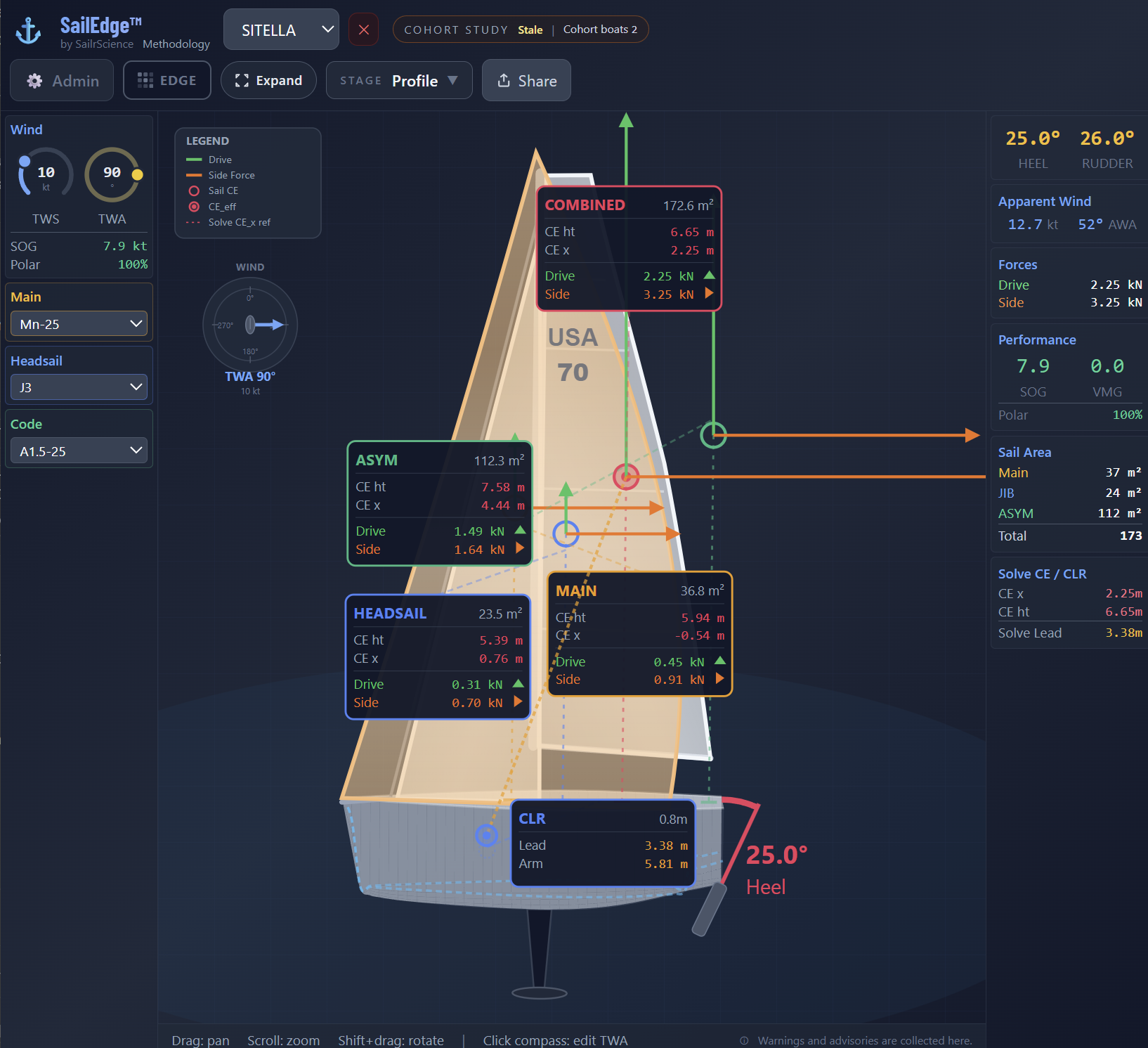
Expert Mode opens the force-balance layer. Every cell expands from a speed delta into a
full diagnostic: per-sail drive and side force, CE geometry, effective areas, heel
equilibrium, whole-boat outcome, wave-lane disclosure, and confidence scoring. Roughly
the same 72 cells, but with the diagnosis layer opened up. The delta stops being a color
and starts being a diagnosis.
Sail tuning, boat tuning, per-sail physics fingerprints, and portable calibration profiles (the validated, saved boat-side profile that every sailmaker’s sail-side model builds on) are
available as bounded professional controls. Sailmakers work on the sail side. Naval
architects review the live R16 runtime hydro families and bounded residual overlays.
Everything computes server-side. The ORC baseline stays anchored. Invalid
configurations are flagged, not hidden. Features like crew weight what-if that
started in the expert layer have graduated to the subscriber tier — because the physics are
stable enough for every subscriber.
Boat Tuning now includes a Delft-style RM stability profile (the boat’s righting behavior — rated on the certificate, then computed by the R16 stability layer for each sailing state) for form vs ballast
heel tuning, a geometry-first cross-section editor with Beam scale, Sheer lift,
Rail lift, and Keel drop, and section-aware 3D review. Save hull-section editing
as a portable JSON artifact.
See hull tuning in action →
The design what-if rides the same professional surface — bowsprit and
ballast deltas solved as a candidate lane against the ORC-certified baseline.
The bowsprit, as a
perturbation study →
Expert Mode — per-sail force breakdown with CE positions, drive and side forces, combined CE, and CLR.
Wind Regime Provenance
Your bands come from your certificate — and say so.
Generate wind regimes from your sail inventory and the Edge Map (the performance delta grid — every sail measured against your boat’s ORC polar at every wind speed and angle) derives the
jib-vs-kite crossover from your own certificate’s live baseline solve, cell by cell.
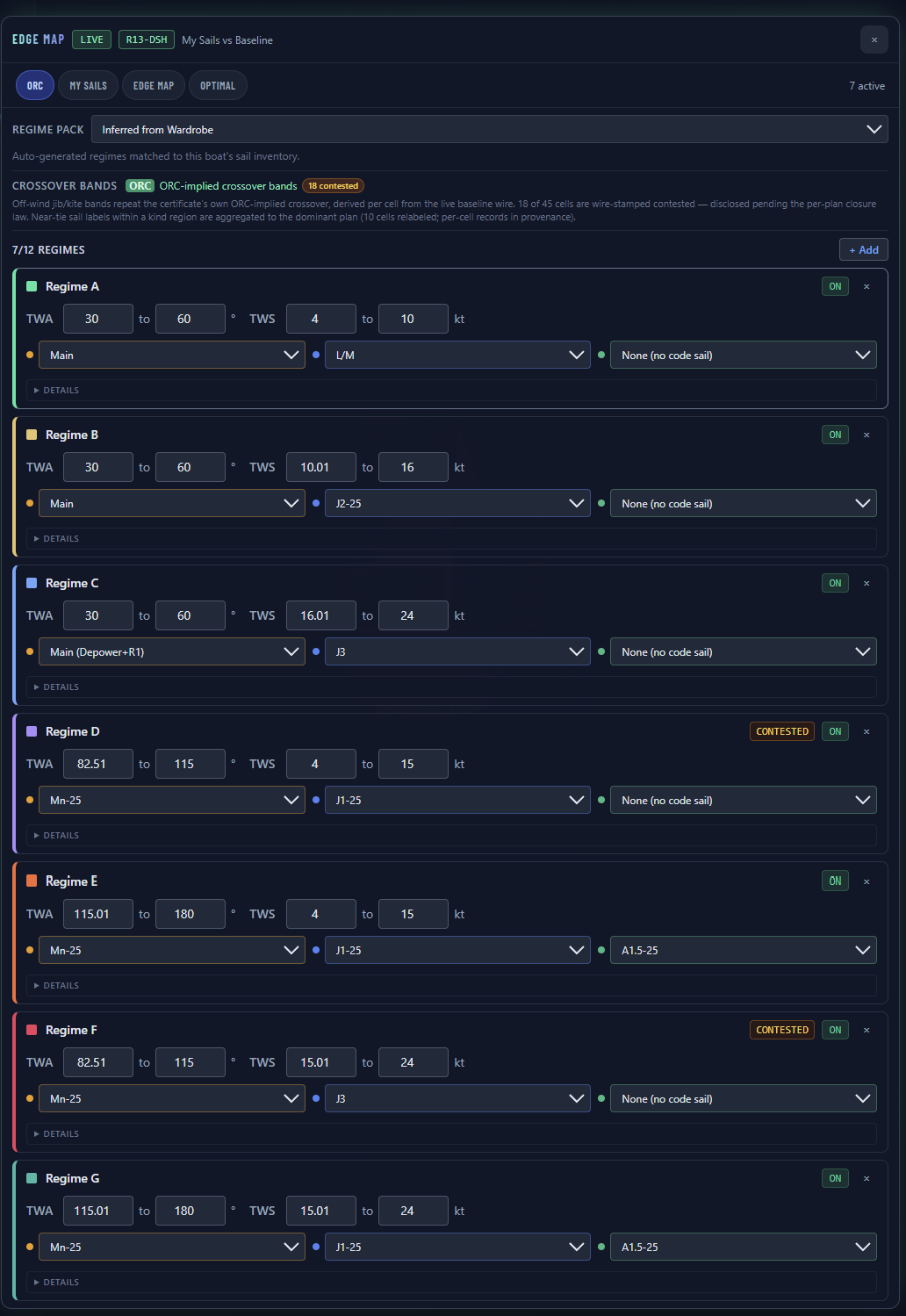
The result carries its provenance on its face: an ORC badge when the bands
repeat the certificate’s own implied crossover, a disclosure line for every
aggregation, and a CONTESTED chip on any band where jib-vs-kite is genuinely
contested on the wire — disclosed, never silently resolved.
Generated regime bands with their provenance on the face — the ORC badge, the wire-derivation disclosure, and CONTESTED chips where the certificate itself is genuinely contested.
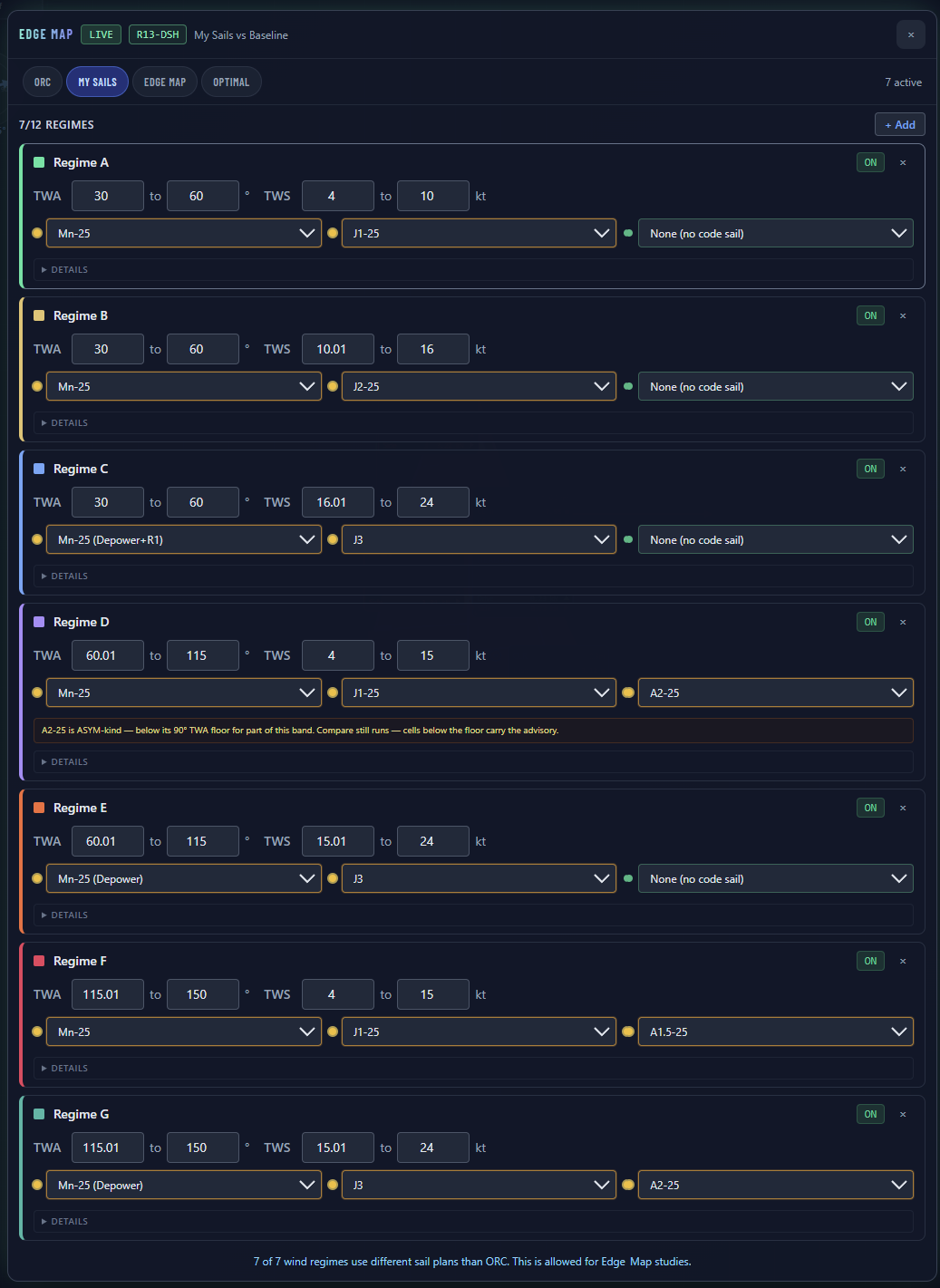
A quiet card is a healthy card. Badges appear only when they answer a real
question — provenance that isn’t authoritative, a contested crossover, a sail
outside its effective range. Your sail choices are decisions, never deviations.
The card face stays quiet — pickers, ranges, ON. The one amber note is a real physics advisory: a kite authored below its wind-angle floor, disclosed and still allowed to run.
Who it’s for
What each tier can do
Higher tiers open the drilldowns. The physics was never the paywall.
Tuning never changes your ORC certificate data.
Tuning parameters shape how the model interprets your boat’s physics.
The certified polar grid (the certificate’s polar performance grid — the official ORC speeds at each wind speed and angle that every Edge Map delta is measured against), the rated stability values, the rig dimensions —
those stay exactly as issued, regardless of what you adjust in Sail Tuning
or Boat Tuning.
Your certificate is the floor. Expert Mode works above it. Protected
partner implementation stays server-side.
Professional access
The right tool for every role
For Sail Lofts
Tune how the runtime represents your sails. Save your calibration as a portable
Sail Tuning Profile (the loft design team’s sail-side characterization — planform geometry, bounded tuning and construction insight, evaluated against on-water test data) — it travels across any boat your customers bring in.
Per-sail physics fingerprints package your recommended tuning in one click.
Per-cell force breakdowns and whole-boat outcome show exactly where your sails
win and why. Every customer who loads your profile sees an Edge Map built on
your data.
Your hull data shouldn’t stay in your design files. Boat tuning profiles
let you encode your platform knowledge into SailEdge™ — starting with
the live R16 hydro families and only reaching for residual overlays when needed.
Validate the model against known behavior. Save the profile. The class fleet
benefits.
Expert Mode isn’t just for lofts. If you read VPP papers, argue about
upwind sail trim at the dock, and want to know exactly why cell 8 went red
— this is for you.
Experiment on top of your loft’s calibration. Explore force breakdowns,
whole-boat outcome, and confidence cues cell by cell. Save named tuning
profiles for your racing conditions.